Select Page

Hospital Inventory Management

Sr. Product Designer
Inventory Hub Landing Page

The Problem

Users told us:
  • Confusing and difficult to learn
  • Click-heavy for common tasks
  • Overloaded with irrelevant alerts
  • Hard to read due to poor typography
  • Better analyzed in Excel than in the product itself
Business needed to:
  • Maintain stability while modernizing
  • Show visible improvements to clients
  • Work within limited design and development resources.

Discovery

To understand both the product and its constraints, we:

  • Conducted heuristic evaluations
  • Reviewed prior usability studies
  • Surveyed all users about pain points
  • Interviewed users to understand workflows
  • Visited hospitals to observe real usage
  • Created personas and journey maps

Key Insights

Users didn’t need more features — they needed clarity, orientation, and faster access to what mattered to their role.

Design Approach

Modernizing a legacy ecosystem isn’t just about a new coat of paint; it’s about maintaining workflow continuity while introducing 21st-century capabilities.

My contributions spanned the entire product lifecycle—from rebuilding fundamental navigation structures to working on new features added to the Legacy Application.

Here is a look at how I approached these diverse challenges across both our modernization efforts and our legacy system updates.

Building the Future Vision

These designs represented a future-state vision for the platform. While full implementation was paused, they established design principles and served as a north star for incremental improvements.

Navigation

I led the effort to map out a new information hierarchy to consolidate tasks and reduce click-depth across the application. My focus was creating a “Future State” navigation that simplified complex workflows for our various user personas.

While a strategic pivot to prioritize legacy stability shifted our immediate implementation, this architectural work became the blueprint for our modernization strategy—ensuring that even our navigation MVP was grounded in a consistent, long-term UX vision.

Key Pain Points

The original navigation was hyper-fragmented, requiring a new page for every minor action. This created a high “interaction cost” and left users feeling disoriented.

  • Action Fragmentation: Users had to navigate to separate pages for tasks that logically belonged in a single workspace.

  • Lack of Orientation: Without a definitive “Home” or landing page, users lacked a starting point or a mental map of the app.

  • Search Redundancy: Having two different search methods for the same product catalog created “choice paralysis.”

  • Weak Wayfinding: A lack of global search and unclear location context made it difficult for users to answer the question, “Where am I right now?”

Solutions

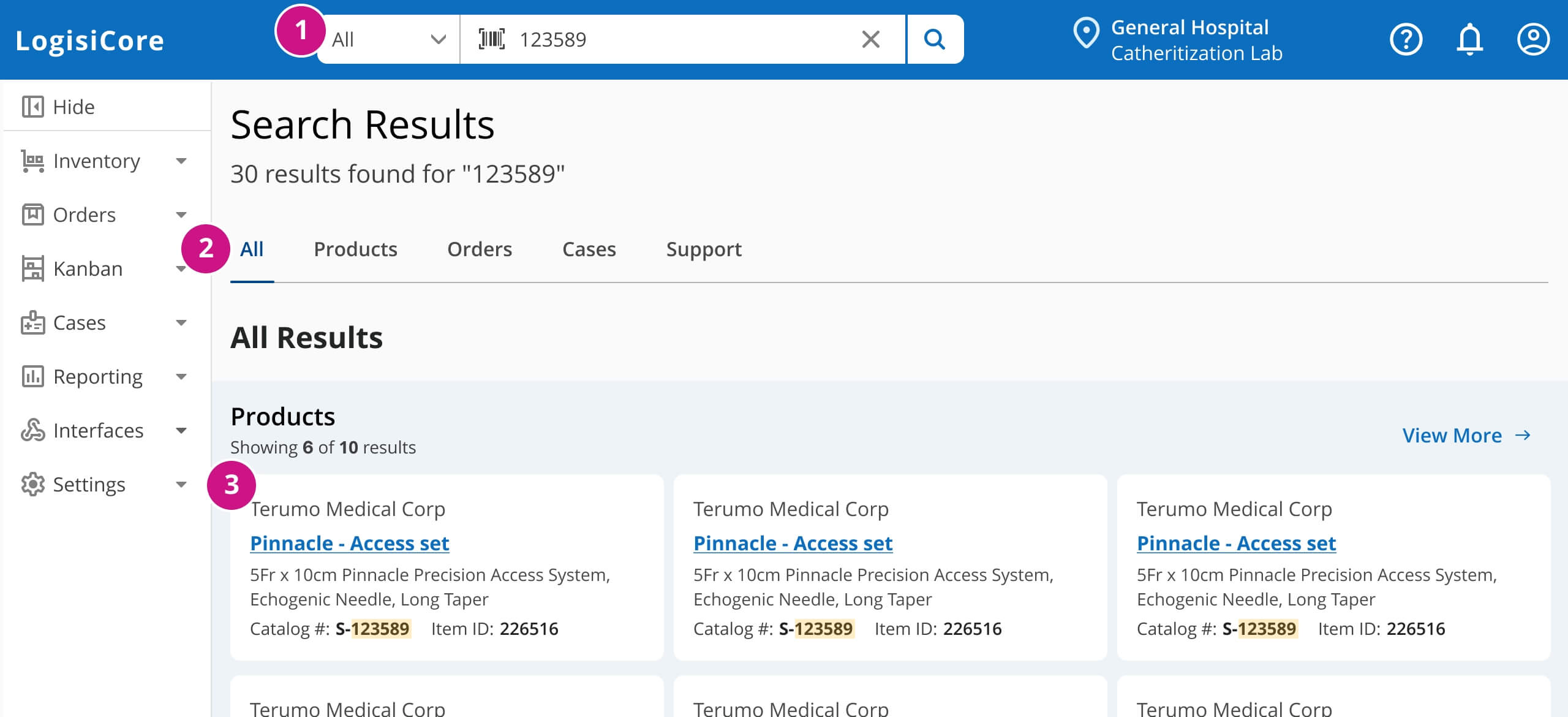
While the visual design language was adopted, the underlying site architecture remained static due to technical constraints. I pivoted my focus to high-impact interface features like the inclusion of a global search to solve navigation issues without requiring a backend overhaul.

  • Included a global search where a user could conduct a search query anywhere in the applicaiton. 
  • Future notifications area to communicate important transactions such as transfer requests/approvals, product updates, order updates, etc. 
  • Static landing page (personalized hub) instead of a favorite page. The landing page would be a personalized hub based on the user’s job function. 
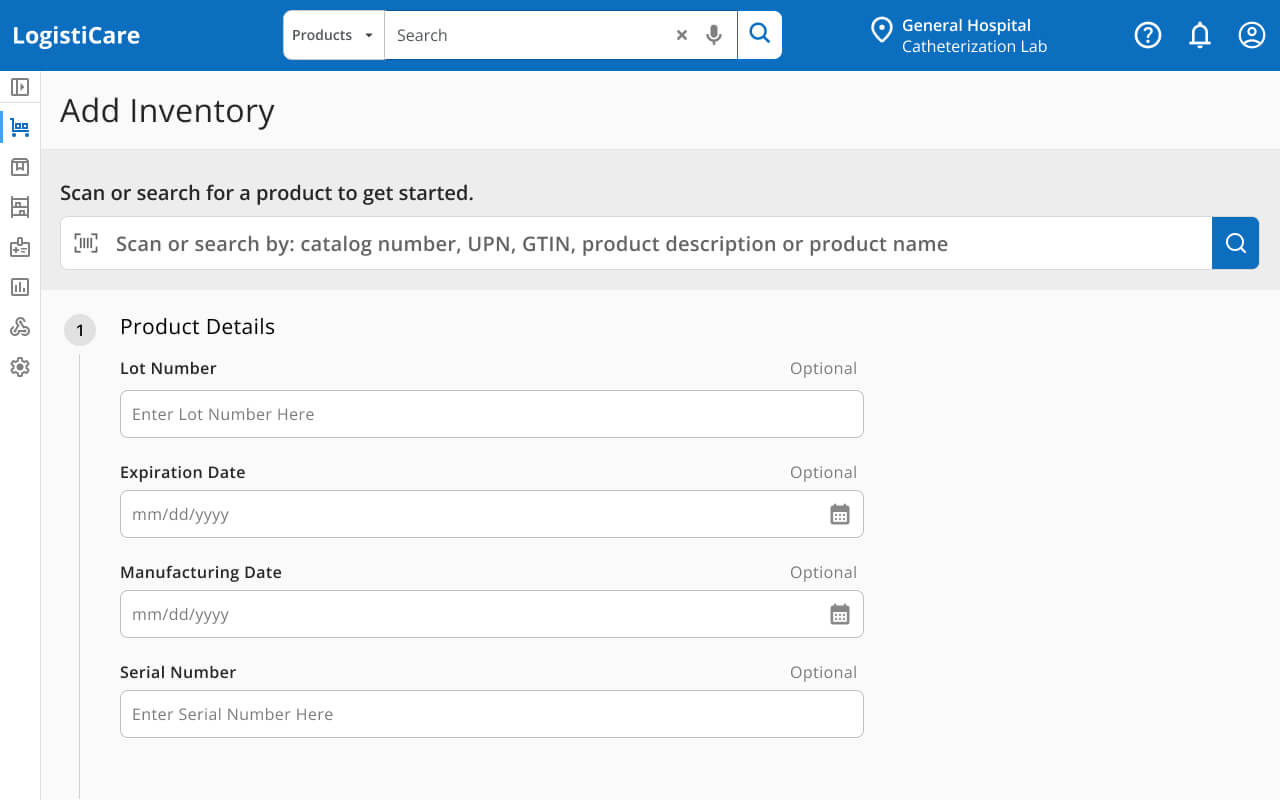
  • The side navigation would be simplified (if site architecture had moved forward) and would be collapsible to allow for more workspace for the user. 

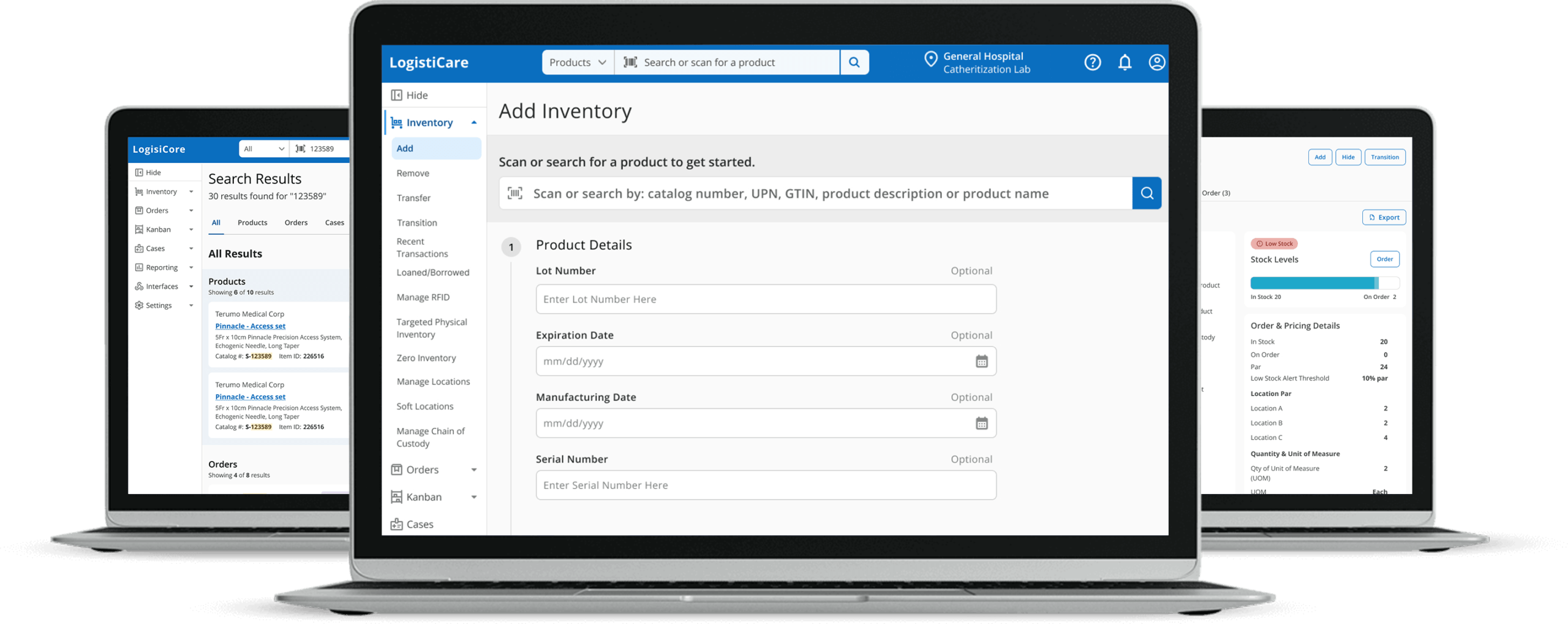
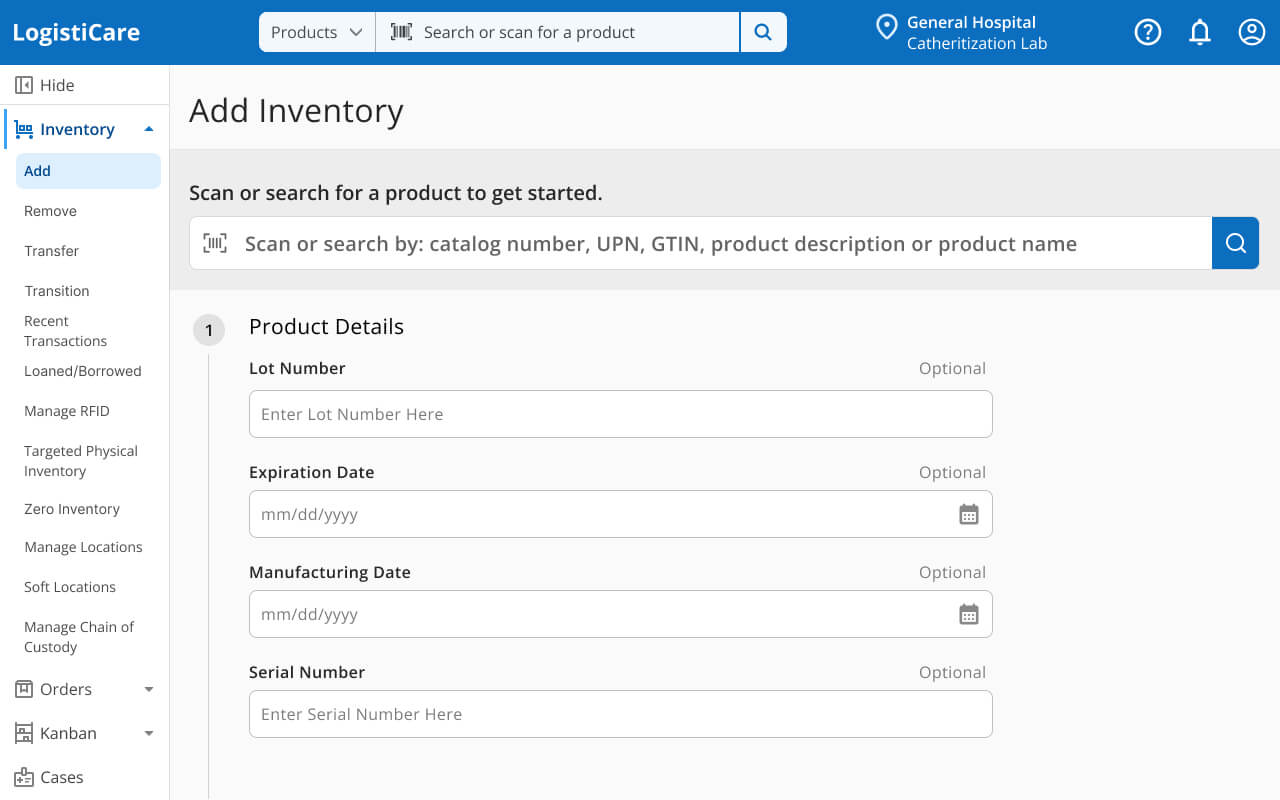
This shows the MVP navigation structure with the new design. I also made sure that global actions such as global search, notifications, account management were displayed globally on the header.

Product Details

The Challenge: Consolidating a Fragmented Inventory Lifecycle: In the legacy system, the Product Details experience was a significant bottleneck for Inventory Specialists. The workflow was split between a ‘View’ mode that lacked data and an ‘Edit’ mode that overwhelmed users with unnecessary fields. This forced users into a high-risk ‘Edit’ state just to find information. My goal was to move away from these fragmented pages toward a unified Product 360 view—a single source of truth that provided a complete narrative of a product from intake to final disposition.

Key Paint Points
  • Information Scarcity: The ‘Product Details’ view failed to provide a full data set, forcing users to seek workarounds.

  • The Edit-State Trap: Inventory Specialists relied on the ‘Edit Product’ view as their primary source of information because it was more comprehensive, despite the risk of accidental data modification.

  • Context Switching: Users had to navigate between multiple screens to verify usage, stock levels, and chain of custody, leading to a disjointed narrative of the product’s history.

The Solution

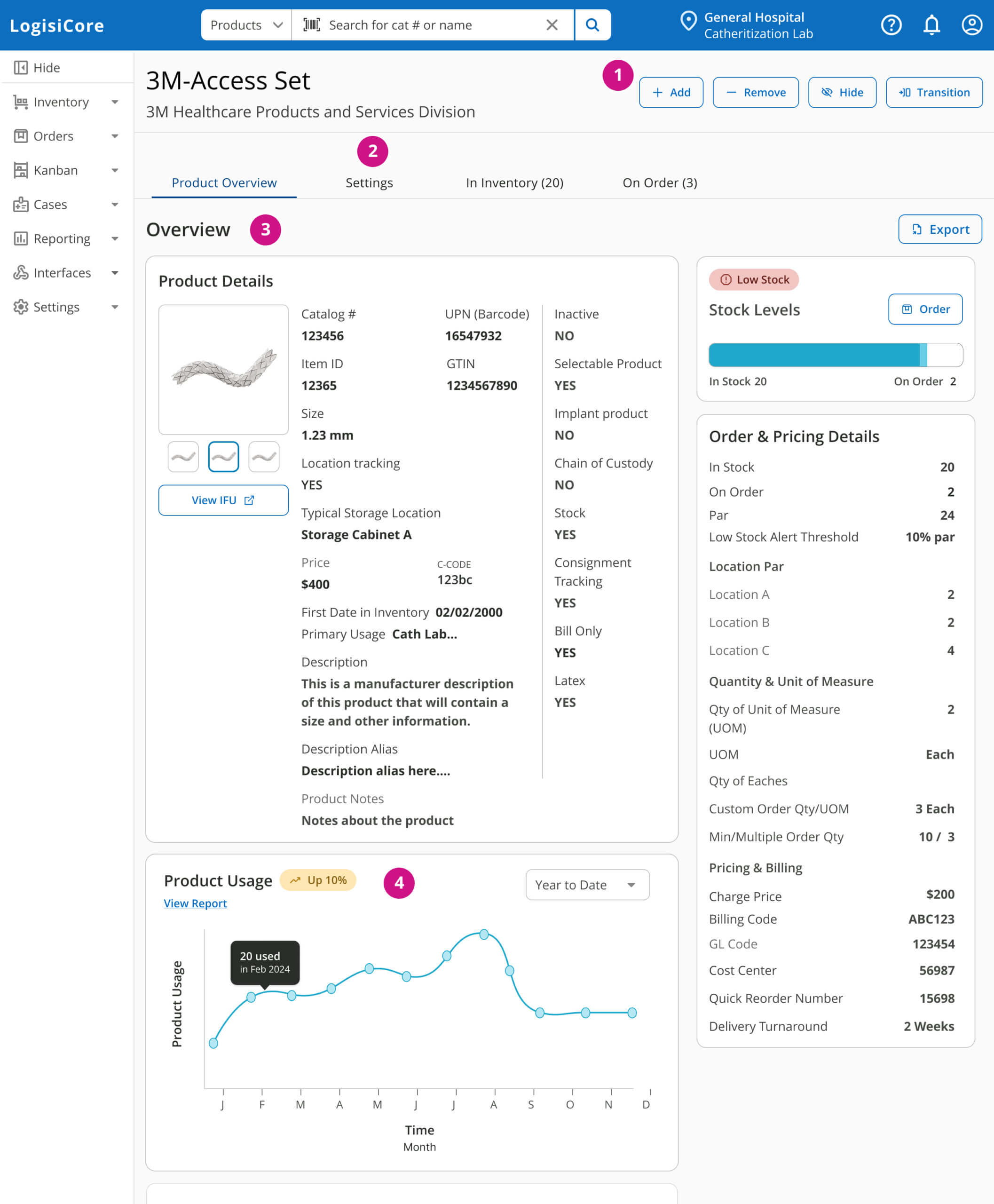
The goal was to provide an all in one product 360 view for inventory managers and specialists.

  • Unified Data Architecture: Created a consolidated “Product 360” dashboard that eliminated the need for “view vs. edit” toggling.

  • Holistic Usage & Stock Overview: Integrated high-level usage metrics and real-time stock levels at the top of the hierarchy for immediate visibility.

  • Lifecycle Transparency: Surfaced product instances and Chain of Custody records in the primary view to provide a complete audit trail.

  • Contextual Editing: Integrated the ability to update settings directly within the view, removing the friction of navigating to a separate page.

Partial view of the Product 360 feature. The idea here was simple. Provide inventory users with a wholistic view of their product instead of having to piece mail it together from different parts of the application.

Alerts Landing Page

The Transformation: From Generic Alerts to Personalized Role-Based Hubs “The legacy ‘Alerts’ page functioned as a global catch-all, overwhelming users with a high volume of noise that often didn’t pertain to their specific responsibilities. By conducting user research across three distinct personas—Managers, Inventory Specialists, and Clinicians—I identified that ‘value’ was subjective to each role. I led the transition from a static notification list to a Personalized Hub Concept, a role-based landing experience that surfaces high-priority, actionable data points tailored to the user’s daily workflow

Key Pain Points
  • Cognitive Overload: The universal alerts page presented a high volume of data, much of which was irrelevant to the specific user’s task list.

  • Role-Based Data Friction: Inventory Specialists were forced to filter through financial data they didn’t need to find critical out-of-stock items, while Managers lacked the high-level monetary snapshots they required.

  • Feature Underutilization: A ‘Favorites’ customization feature existed but had near-zero adoption, indicating that users needed an automated, “smart” default rather than manual configuration.

  • Clinician Disengagement: Because the page didn’t surface patient-centric data (like case lists), Clinicians bypassed the home experience entirely, missing out on potentially critical updates.

The Solution: A Personalized Hub
  • Role-Specific Data Prioritization: Designed unique “Hub” modules that automatically surface KPIs based on user permissions—e.g., Inventory Value for Managers and Case Lists for Clinicians.
  • At-a-Glance Operational Stats: Implemented high-level “Quick Stats” cards to provide immediate status checks on backorders and stock levels without requiring deep navigation.
  • Automated Personalization: Eliminated the friction of manual “Favorites” settings by delivering a “Smart Home” experience that defaults to the most relevant tools for each persona.
  • Contextual Actionability: Transformed the page from a passive “Alerts” list into an active “Workday Launcher,” ensuring users could start their highest-priority tasks directly from the landing page.

The inventory specialist view of their dashboard or hub. Things to note here are alerts tailored to to their workflow and what is most important for them such as out of stock products, usage spikes, and a quick way to get to their full inventory view.

$

The Pivot: From Vision to Velocity

Mid-project, our focus shifted toward immediate system stability and budget optimization. Following a corporate acquisition, we pivoted to prioritize immediate system stability and to pause the full redesign and prioritize the existing ASP.NET platform.

The Product North Star: Rather than shelving the redesign, these designs into a “North Star” blueprint. This ensured that the organization retained a fully-vetted UX roadmap for future phases.

The Legacy Opportunity: I saw this not as a constraint, but as a challenge: How can I apply modern UX principles to a 20-year-old system? I shifted my focus to high-value, “low-lift” improvements that worked within technical limitations to provide immediate, measurable value to our users.

The Reality: Modernizing a 20-Year-Old System

These improvements were designed and implemented within the legacy architecture. Each one required navigating technical constraints, stakeholder politics, and competing priorities—while still delivering measurable UX value.

Reporting Enhancements

The Transformation: From Raw Data Exports to Actionable Intelligence

The legacy ‘Usage Transfer Report’ functioned merely as a data repository, forcing users to export large datasets to Excel for manual analysis and decision-making. This friction slowed down inventory optimization and increased the risk of human error. I led the redesign of the reporting interface to move beyond ‘raw data’ and toward ‘actionable intelligence,’ surfacing smart recommendations and financial impact directly within the UI to streamline the transfer process.

Key Pain Points
  • Manual Analysis Bottleneck: Users were forced into a time-consuming “Export-to-Excel” workflow to identify inventory transfer opportunities.

  • Lack of Predictive Guidance: The system provided raw numbers but zero insight into where products should be moved from or how much could be safely transferred.

  • Invisible Financial Impact: Potential cost savings were buried in the data, making it difficult for managers to quantify the value of inventory movements.

  • Low Information Density: A poor visual hierarchy made it difficult for users to scan the report for outliers or high-priority items quickly.

The Solutions
  • Surfaced Actionable Insights: Integrated a “Smart Recommendation” engine that automatically suggests transfer sources, eliminating manual guesswork.

  • Real-Time Financial Analytics: Implemented a “Cost Savings” calculator visible at the line-item level, providing immediate business justification for transfers.

  • Automated Quantity Calculation: Designed clear indicators for “Transferable Quantities” to prevent stockouts while maximizing inventory efficiency.

  • Enhanced Visual Hierarchy: Modernized the data presentation with a high-density, scannable layout that prioritizes the most critical decision-making metrics.

Outcome: Data Driven Efficiency

During usability testing, Supply Chain Analysts noted a significant reduction in cognitive load, as the report provided actionable insights directly within the platform—eliminating the need for manual Excel manipulation. By digitizing “institutional knowledge,” the tool allowed hospitals to identify stock transfer opportunities instantly, representing a high-potential cost-saving asset for inventory management.

The report served as a critical interim step; by leveraging Palantir AI to surface transfer recommendations, we moved ‘institutional knowledge’ into the product, setting the logic foundation for a future, fully automated in-app transfer module

Instructions for Use (IFU) Library

The Strategy: Centralizing Compliance for Audit Readiness

In the high-stakes environment of hospital compliance, missing documentation isn’t just a workflow bottleneck—it’s a regulatory risk. Previously, Instructions for Use (IFU) documents were scattered across external drives and physical folders, disconnected from the products they governed. I led the design of a centralized IFU Document Library within the legacy architecture, creating a unified repository that transformed the Joint Commission audit process from a multi-day search into a streamlined, ‘one-stop’ digital experience.

The Key Pain Points
  • Fragmented Documentation: Compliance data lived in “shadow systems” (personal folders, external drives), making it nearly impossible to maintain a single source of truth.

  • Disconnected Data: There was no functional link between a physical product in the inventory and its required regulatory documentation.

  • Audit Vulnerability: Responding to Joint Commission audits was a slow, manual process that relied on tribal knowledge rather than system data.

  • Clinical Friction: Staff couldn’t quickly access critical safety instructions during procedures, potentially impacting patient care and operational efficiency.

The Solution
  • Integrated Document Architecture: Built a centralized library directly into the inventory system, mapping every IFU to its corresponding product record.

  • Audit-Ready Search & Retrieval: Designed a high-speed search interface specifically optimized for the “pressure-cooker” environment of a regulatory audit.

  • Simplified Upload Workflow: Created an intuitive bulk-upload and tagging system that allowed administrators to move documentation from external silos into the centralized library with minimal effort.

  • On-Demand Clinical Access: Surfaced document links at the product level, ensuring that clinicians have “two-click” access to safety instructions directly from the inventory view.

    Instructions for Use Library

    Outcome

    Created a true one-stop shop for compliance. Hospitals can now instantly provide IFU documentation for audits, directly from the system.

    Reflection

    This project taught me that senior design work isn’t about having unlimited resources or perfect conditions—it’s about adapting to reality while maintaining UX principles.

    Working within a 20-year-old ASP.NET system required navigating technical debt, stakeholder politics, and shifting priorities. But by staying focused on user needs and business constraints, I delivered improvements that users actually praised—proving that good UX doesn’t require starting from scratch.

    Let's Connect!

    Hi I'm Jill! I have 13 years of experience in design, primarily in healthcare, I focus on creating clear, well-crafted experiences for complex systems. Let’s connect.